---
title: Import Year to Date Data
description: Import YTD data
---
[Skip to content](https://support.ocerli.com/en/ocerli-knowledge-base/import-year-to-date-data#main-content)
English
Show submenu for translations
[](https://144147338.hs-sites-eu1.com/ocerli-knowledge-base?hsLang=en)
- [Back to App](https://app.ocerli.com)
- [What's New](https://app-eu1.hubspot.com/knowledge-article/144147338/editor/353284586703/preview)
Open main navigation
Close main navigation
- [Back to App](https://app.ocerli.com)
- [What's New](https://app-eu1.hubspot.com/knowledge-article/144147338/editor/353284586703/preview)
- English
Show submenu for translations
- [Contact us](https://share-eu1.hsforms.com/1HogeT6kKQWyiH9o4PZAqtA2dtksq)
[Contact us](https://share-eu1.hsforms.com/1HogeT6kKQWyiH9o4PZAqtA2dtksq)
How can we help you?
- There are no suggestions because the search field is empty.
1. [Ocerli](https://support.ocerli.com/en/ocerli-knowledge-base?hsLang=en)
2. [Getting started](https://support.ocerli.com/en/ocerli-knowledge-base/getting-started?hsLang=en)
3. [Organisation Imports](https://support.ocerli.com/en/ocerli-knowledge-base/getting-started?hsLang=en#organisation-imports-1)
# Import Year to Date Data
## The year-to-date import allows you to import your employees' earnings to ensure accuracy in the YTD fields in the payslips.
The year-to-date import will allow you to import your employee's earnings, contributions, Tax, and pension information for the year so far. This means your employees will have an accurate YTD figure in their payslips and will give them continuity if you join Ocerli part-way through the financial year.
**Please note: Imported data is not reportable and is purely for employees to have correct YTD totals displayed in their payslips.**
**Click DOWNLOAD TEMPLATE**
You can download existing YTD data by selecting the box. You also have the option to include leavers with the export file; if you don't select this, only active employees will be included in the import file. You can then complete the YTD data for your employees. Once you have completed this, save the spreadsheet in your documents.
**Click on PROCESS POPULATED FILE and select the Excel file in your documents**
You also have the option here to select 'replace' all existing data if you are replacing an existing YTD import. Please note that this will delete any existing YTD data imported.
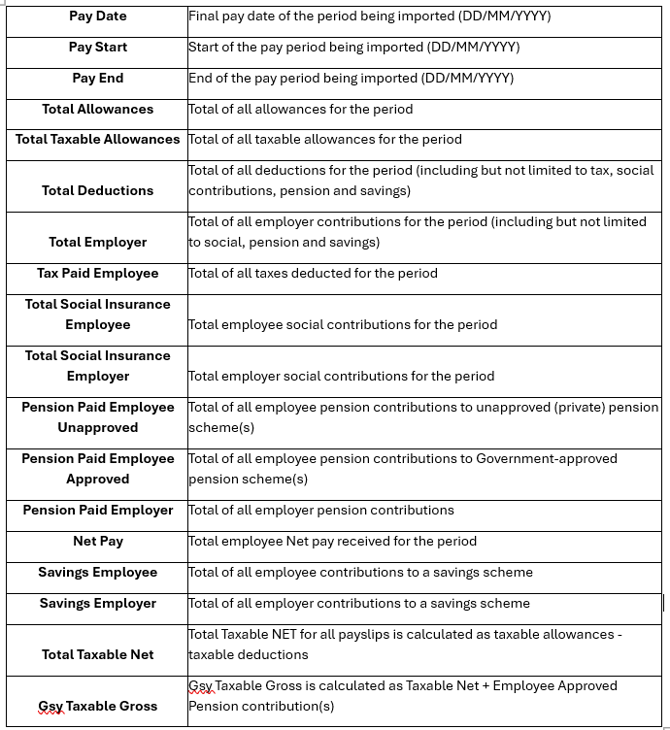
Below is some useful guidance on the expected input for each field of the YTD import template:
- [Getting started](https://support.ocerli.com/en/ocerli-knowledge-base/getting-started?hsLang=en#main-content)
- [Your Account Details](https://support.ocerli.com/en/ocerli-knowledge-base/getting-started?hsLang=en#your-account-details)
- [Navigating the App](https://support.ocerli.com/en/ocerli-knowledge-base/getting-started?hsLang=en#navigating-the-app)
- [Users](https://support.ocerli.com/en/ocerli-knowledge-base/getting-started?hsLang=en#users)
- [Organisation Imports](https://support.ocerli.com/en/ocerli-knowledge-base/getting-started?hsLang=en#organisation-imports-1)
- [Jersey Organisation Imports](https://support.ocerli.com/en/ocerli-knowledge-base/getting-started?hsLang=en#jersey-organisation-imports)
- [Organisation Set Up](https://support.ocerli.com/en/ocerli-knowledge-base/getting-started?hsLang=en#organisation-set-up)
- [Add New Organisation](https://support.ocerli.com/en/ocerli-knowledge-base/getting-started?hsLang=en#add-new-organisation)
- [Add New Employees](https://support.ocerli.com/en/ocerli-knowledge-base/getting-started?hsLang=en#add-new-employees)
- [Jersey Employees](https://support.ocerli.com/en/ocerli-knowledge-base/getting-started?hsLang=en#jersey-employees)
- [Workflows](https://support.ocerli.com/en/ocerli-knowledge-base/getting-started?hsLang=en#workflows)
- [Pay Elements](https://support.ocerli.com/en/ocerli-knowledge-base/getting-started?hsLang=en#pay-elements)
- [Submissions](https://support.ocerli.com/en/ocerli-knowledge-base/submissions?hsLang=en#main-content)
- [Jersey](https://support.ocerli.com/en/ocerli-knowledge-base/submissions?hsLang=en#jersey)
- [Guernsey](https://support.ocerli.com/en/ocerli-knowledge-base/submissions?hsLang=en#guernsey)
- [Submission Module](https://support.ocerli.com/en/ocerli-knowledge-base/submissions?hsLang=en#submission-module)
- [Pensions](https://support.ocerli.com/en/ocerli-knowledge-base/pensions?hsLang=en#main-content)
- [Guernsey](https://support.ocerli.com/en/ocerli-knowledge-base/pensions?hsLang=en#guernsey)
- [Guernsey Pay Element Settings](https://support.ocerli.com/en/ocerli-knowledge-base/pensions?hsLang=en#guernsey-pay-element-settings)
- [App & Integrations](https://support.ocerli.com/en/ocerli-knowledge-base/app-integrations?hsLang=en#main-content)
- [Xero](https://support.ocerli.com/en/ocerli-knowledge-base/app-integrations?hsLang=en#xero)
- [PeopleHR](https://support.ocerli.com/en/ocerli-knowledge-base/app-integrations?hsLang=en#peoplehr)
- [QuickBooks](https://support.ocerli.com/en/ocerli-knowledge-base/app-integrations?hsLang=en#quickbooks)
- [More Resources](https://support.ocerli.com/en/ocerli-knowledge-base/more-resources?hsLang=en#main-content)
- [App Updates](https://support.ocerli.com/en/ocerli-knowledge-base/more-resources?hsLang=en#app-updates)
- [Troubleshooting](https://support.ocerli.com/en/ocerli-knowledge-base/troubleshooting?hsLang=en#main-content)
- [Isle of Man](https://support.ocerli.com/en/ocerli-knowledge-base/troubleshooting?hsLang=en#isle-of-man)
- [Payroll](https://support.ocerli.com/en/ocerli-knowledge-base/payroll?hsLang=en#main-content)
- [Bulk Actions](https://support.ocerli.com/en/ocerli-knowledge-base/payroll?hsLang=en#bulk-actions)
- [Run Payroll](https://support.ocerli.com/en/ocerli-knowledge-base/payroll?hsLang=en#run-payroll)
- [Banking](https://support.ocerli.com/en/ocerli-knowledge-base/payroll?hsLang=en#banking)
- [Reporting](https://support.ocerli.com/en/ocerli-knowledge-base/reporting?hsLang=en)
[](http://offshorepayroll.com)
[mailto:support@ocerli.com](mailto:support@ocerli.com)
Copyright © 2026, Ocerli