---
title: 4. Creating Pension Pay Elements
description: Pay elements are payslip items used to process in an employee's payslip.
---
[Skip to content](https://support.ocerli.com/en/ocerli-knowledge-base/4.-creating-pension-pay-elements#main-content)
English
Show submenu for translations
[](https://144147338.hs-sites-eu1.com/ocerli-knowledge-base?hsLang=en)
- [Back to App](https://app.ocerli.com)
- [What's New](https://app-eu1.hubspot.com/knowledge-article/144147338/editor/353284586703/preview)
Open main navigation
Close main navigation
- [Back to App](https://app.ocerli.com)
- [What's New](https://app-eu1.hubspot.com/knowledge-article/144147338/editor/353284586703/preview)
- English
Show submenu for translations
- [Contact us](https://share-eu1.hsforms.com/1HogeT6kKQWyiH9o4PZAqtA2dtksq)
[Contact us](https://share-eu1.hsforms.com/1HogeT6kKQWyiH9o4PZAqtA2dtksq)
How can we help you?
- There are no suggestions because the search field is empty.
1. [Ocerli](https://support.ocerli.com/en/ocerli-knowledge-base?hsLang=en)
2. [Pensions](https://support.ocerli.com/en/ocerli-knowledge-base/pensions?hsLang=en)
3. [Guernsey](https://support.ocerli.com/en/ocerli-knowledge-base/pensions?hsLang=en#guernsey)
# 4. Creating Pension Pay Elements
## Creating Pension Pay Elements
If you have already got your pension pay elements set up, you can skip ahead to **steps 2 and 3.**
If you are processing a pension for the first time, you may need to set up new pension pay elements in line with your pension policy
Please follow the steps below to create an employee deduction type pension pay element.
**Step 1: Creating Pension Pay Elements**
**Step 2: Updating AVC (Additional Voluntary Contribution) Pay Elements**
If you have existing pension pay elements for an additional voluntary contribution by your employees into a pension you will need to update them to indicate that they are an AVC.
**Step 3 - Checking Your Pensionable Pay Element Settings**
The earnings to be used for calculating secondary pensions will be the same as the ones you use to calculate social security contributions.
These will include commission, bonuses, overtime payments and other such remuneration, for example tips collected by the Employer and shared out. The contributions should be calculated based on all the earnings up to the Upper Earnings Limit and will include and earnings below the Lower Earnings Limit.
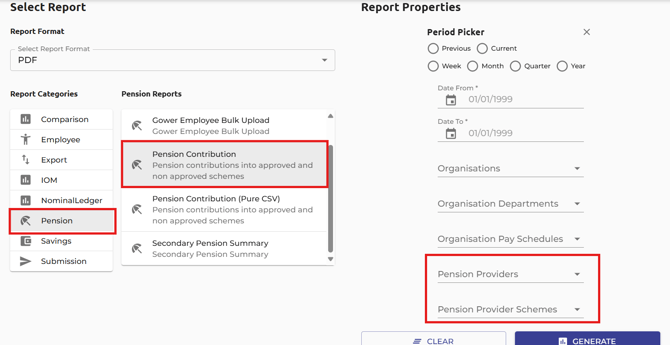
**Next Steps:** You can now use our enhanced Pensions Reporting to help with internal processes and report contributions to your pension provider. Our enhanced pensions reporting allows you to see a breakdown of employee’s pension contributions into the various providers and schemes you have created.
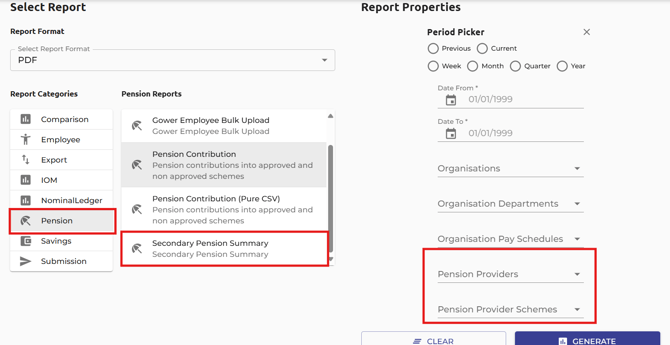
The **Secondary Pension Summary** provides a summary of all contributions reported in the secondary pension report.
- [Getting started](https://support.ocerli.com/en/ocerli-knowledge-base/getting-started?hsLang=en#main-content)
- [Your Account Details](https://support.ocerli.com/en/ocerli-knowledge-base/getting-started?hsLang=en#your-account-details)
- [Navigating the App](https://support.ocerli.com/en/ocerli-knowledge-base/getting-started?hsLang=en#navigating-the-app)
- [Users](https://support.ocerli.com/en/ocerli-knowledge-base/getting-started?hsLang=en#users)
- [Organisation Imports](https://support.ocerli.com/en/ocerli-knowledge-base/getting-started?hsLang=en#organisation-imports-1)
- [Jersey Organisation Imports](https://support.ocerli.com/en/ocerli-knowledge-base/getting-started?hsLang=en#jersey-organisation-imports)
- [Organisation Set Up](https://support.ocerli.com/en/ocerli-knowledge-base/getting-started?hsLang=en#organisation-set-up)
- [Add New Organisation](https://support.ocerli.com/en/ocerli-knowledge-base/getting-started?hsLang=en#add-new-organisation)
- [Add New Employees](https://support.ocerli.com/en/ocerli-knowledge-base/getting-started?hsLang=en#add-new-employees)
- [Jersey Employees](https://support.ocerli.com/en/ocerli-knowledge-base/getting-started?hsLang=en#jersey-employees)
- [Workflows](https://support.ocerli.com/en/ocerli-knowledge-base/getting-started?hsLang=en#workflows)
- [Pay Elements](https://support.ocerli.com/en/ocerli-knowledge-base/getting-started?hsLang=en#pay-elements)
- [Submissions](https://support.ocerli.com/en/ocerli-knowledge-base/submissions?hsLang=en#main-content)
- [Jersey](https://support.ocerli.com/en/ocerli-knowledge-base/submissions?hsLang=en#jersey)
- [Guernsey](https://support.ocerli.com/en/ocerli-knowledge-base/submissions?hsLang=en#guernsey)
- [Submission Module](https://support.ocerli.com/en/ocerli-knowledge-base/submissions?hsLang=en#submission-module)
- [Pensions](https://support.ocerli.com/en/ocerli-knowledge-base/pensions?hsLang=en#main-content)
- [Guernsey](https://support.ocerli.com/en/ocerli-knowledge-base/pensions?hsLang=en#guernsey)
- [Guernsey Pay Element Settings](https://support.ocerli.com/en/ocerli-knowledge-base/pensions?hsLang=en#guernsey-pay-element-settings)
- [App & Integrations](https://support.ocerli.com/en/ocerli-knowledge-base/app-integrations?hsLang=en#main-content)
- [Xero](https://support.ocerli.com/en/ocerli-knowledge-base/app-integrations?hsLang=en#xero)
- [PeopleHR](https://support.ocerli.com/en/ocerli-knowledge-base/app-integrations?hsLang=en#peoplehr)
- [QuickBooks](https://support.ocerli.com/en/ocerli-knowledge-base/app-integrations?hsLang=en#quickbooks)
- [More Resources](https://support.ocerli.com/en/ocerli-knowledge-base/more-resources?hsLang=en#main-content)
- [App Updates](https://support.ocerli.com/en/ocerli-knowledge-base/more-resources?hsLang=en#app-updates)
- [Troubleshooting](https://support.ocerli.com/en/ocerli-knowledge-base/troubleshooting?hsLang=en#main-content)
- [Isle of Man](https://support.ocerli.com/en/ocerli-knowledge-base/troubleshooting?hsLang=en#isle-of-man)
- [Payroll](https://support.ocerli.com/en/ocerli-knowledge-base/payroll?hsLang=en#main-content)
- [Bulk Actions](https://support.ocerli.com/en/ocerli-knowledge-base/payroll?hsLang=en#bulk-actions)
- [Run Payroll](https://support.ocerli.com/en/ocerli-knowledge-base/payroll?hsLang=en#run-payroll)
- [Banking](https://support.ocerli.com/en/ocerli-knowledge-base/payroll?hsLang=en#banking)
- [Reporting](https://support.ocerli.com/en/ocerli-knowledge-base/reporting?hsLang=en)
[](http://offshorepayroll.com)
[mailto:support@ocerli.com](mailto:support@ocerli.com)
Copyright © 2026, Ocerli